-Photoroom.png)
3 Ways Teams Stores Your Messages and Files: Chats, Channel Posts, and Meetings Explained
Updated: Sep 9, 2025
When you send a message in Microsoft Teams, it might feel like everything lives in one place but behind the scenes, your messages and files are stored in different locations depending on how you use it.
Whether you're chatting with a coworker, posting in a channel, or joining a meeting, knowing where your content lives can help you find files faster, avoid confusion, and support your organization’s data policies.
Here's a quick breakdown of where to find what you need.
Governance Considerations
Before diving in, keep in mind:
Context: Teams is an “interface layer” and the real data lives in Exchange, SharePoint, and OneDrive.
Shared Channels: If you're using Shared Channels, storage may vary depending on tenant configuration.
Meeting Artifacts: Recordings, transcripts, and notes are stored in OneDrive or SharePoint depending on meeting type.
Teams Chat Messages: Stored in Exchange Online
One-on-one and group chat messages (not Team messages or channel posts) are stored in the mailboxes of the chat participants.
User Mailboxes: Messages are stored in each participant’s Outlook mailbox.
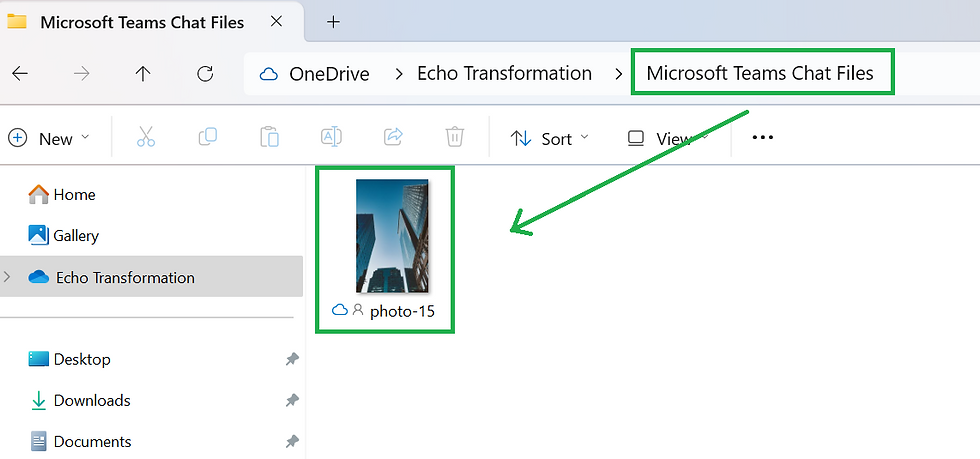
Attachments: Files shared in chats are stored in the sender’s OneDrive for Business, inside a special Microsoft Teams Chat Files folder.
This means: even though chats look like a “separate” tool, they’re actually tied to Outlook + OneDrive under the hood.
Admin Insight: Chat messages are stored in Exchange Online mailboxes. Compliance copies are saved in hidden folders, making them discoverable via Microsoft Purview (eDiscovery).
Teams Channel Posts: Stored in SharePoint Online
Messages posted in a Team channel are stored in the associated SharePoint team site.
Channel Conversations: Metadata and compliance copies are stored in the Microsoft 365 Group mailbox, but the actual messages live in SharePoint.
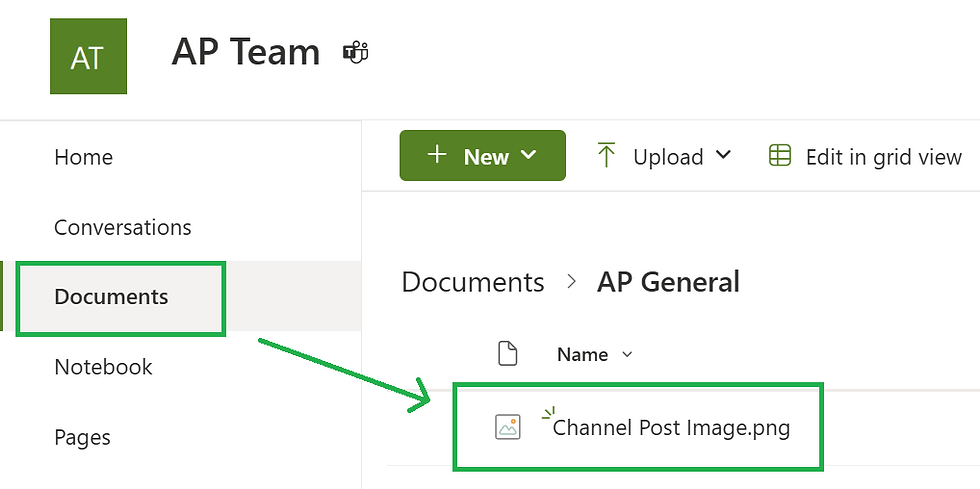
Attachments: Files uploaded to a channel are stored directly in the Team’s SharePoint document library, in the relevant channel folder.
This means: channel conversations and their files are anchored in SharePoint, making them easier to manage alongside the rest of your Team’s documents.
Admin Insight: Channel messages are stored in SharePoint, with metadata in the Microsoft 365 Group mailbox. Attachments are stored in the corresponding SharePoint folder.
Teams Meetings: Regular and Channel
Meetings create content too and where it goes depends on how the meeting was scheduled.
Regular Meetings (Scheduled from Calendar or Chat)
Recordings are saved in the OneDrive of the person who clicked “Record.”
Transcripts are saved with the recording.
Meeting chat is stored in your Outlook mailbox.
Notes (if taken) are saved in OneNote or OneDrive.
Channel Meetings (Scheduled in a Team Channel)
Recordings and transcripts are saved in the Team’s SharePoint site.
Meeting chat is part of the channel conversation.
Notes are saved in the channel’s SharePoint folder.
User Tip: If you’re looking for a meeting recording, check either OneDrive or SharePoint, depending on where the meeting was hosted.

Admin Insight: Meeting artifacts follow the same storage logic OneDrive for personal meetings, SharePoint for channel meetings. Retention and compliance policies apply based on location.
Teams Content Storage Overview
Microsoft Teams stores different types of content: chats, channel posts, and meeting files in different places depending on how you use it.
This quick-reference table shows where your messages and files go, whether you're chatting privately, collaborating in a Team, or hosting a channel meeting.
It’s designed to help both everyday users and IT admins understand what’s stored where, and how to find or manage it.
Content Type | Messages Stored In | Attachments Stored In |
Chat Messages (1:1 or Group) | Exchange Online (your Outlook mailbox) | OneDrive (sender’s “Microsoft Teams Chat Files”) |
Channel Post | SharePoint (Team site) + Group mailbox metadata | SharePoint (channel folder) |
Standard Meeting | Exchange Online (chat), OneDrive (recording) | OneDrive (recording + transcript) |
Channel Meeting | SharePoint (channel conversation) | SharePoint (recording + transcript + notes) |
Meeting Notes | OneNote (linked to meeting or channel) | OneDrive or SharePoint (depending on context) |
Why Does This Matter?
Knowing where Teams content is stored makes a real difference:
Storage Management: Understand what's consuming Exchange vs. SharePoint vs. OneDrive capacity.
User Support: Troubleshoot where a file “really” is when someone can’t find it in Teams.
Retention Policies: Apply the right rules depending on whether content lives in Exchange or SharePoint.
Admin Insight: Ensure you're targeting the right storage location through eDiscovery searches & Legal Holds.

Build Smarter with Teams
Teams is more than chat, it’s an ecosystem built on Exchange, SharePoint, and OneDrive. By knowing where content lives, you can build clearer governance frameworks, apply the right retention policies, and avoid surprises down the road.
At Echo Transformation, we help organizations align Microsoft 365 tools with compliance and collaboration needs, so your data stays accessible, secure, and well-managed.
Ready to untangle Teams storage (and more) for your organization? Book a discovery session with us.


Comments