-Photoroom.png)
5 Reasons to Switch From Folders to a Flat Structure
- echotransformation
- Jul 9, 2025
- 3 min read
Updated: Jul 15, 2025
At Echo Transformation, we help organizations design smarter, more sustainable SharePoint libraries that scale without slowing people down.
That starts with moving beyond traditional folder-based structures and building flat, metadata-driven libraries that make your content easier to find, organize, and govern.
Here’s what a flat structure looks like in SharePoint, why it works better than folders, and how to make the switch without losing your team.

Why Replace Folders With Metadata?
Folders feel familiar but they come with hidden costs. Every extra layer makes it harder to find, filter, or automate around your files.
Switching to a flat structure means storing files without folders and using columns (metadata) to organize, filter, and group content.
You gain:
Faster search and filtering
Clean, consistent views for the whole team
Better automation and reporting
Fewer duplicate files
Stronger version control

Folder-heavy SharePoint library structure 
Flat file SharePoint library structure
Library for Your Documents
Imagine your team stores all project-related files plans, briefs, checklists in one library. Rather than creating a folder for every client and subfolder for each project, you use metadata columns to tag files like:
Client Name
Project Phase
Document Type
Review Date
Fiscal Year
Now you can build custom views like:
“All Documents for ABC Corp”
“Execution Phase Docs from FY2024”
“Files due for review this month”
All without duplicating files or digging through folders.
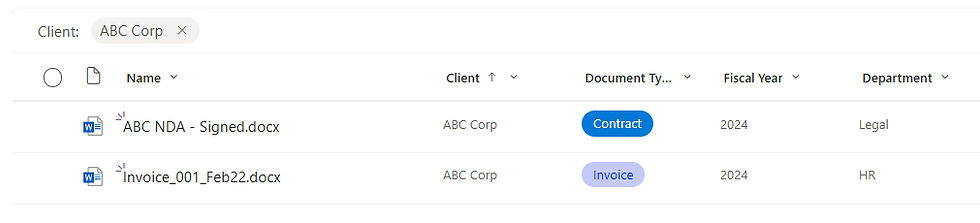
Benefits of a Flat SharePoint Library
1. Smarter Search: Column metadata is prioritized in search results, so queries like “Contract + 2024” return relevant results instantly even without perfect file names.

2. Clean Links That Don’t Break: Since files aren’t moved, shared links remain valid even as views change. Metadata makes files flexible without changing the location.
3. Personalized Views: Each team or role can filter the same library to create their own experience. One file, many use cases.

4. Automated Workflows: Columns like “Review Date” or “Document Type” can trigger flows for reminders, archiving, or approval routing.
5. Better Version Control: One authoritative file tagged five ways is easier to manage than five copies in five folders. Everyone sees the same file from their own lens.
Getting Started with Metadata in SharePoint
To move to a flat structure, start here:
Map common filters. What do people usually ask for? That becomes your metadata.
Create columns. Add site or library-level columns before migrating content.
Migrate with intent. Upload files in bulk and tag them as you go.
Disable folders. In library settings, turn off the “New Folder” option to encourage consistent use.
Build audience views. Customize views based on team needs project status, client, year, etc.
Final Thoughts
If your team struggles to find the right files or ends up rebuilding the same content over and over it’s time to flatten your structure.
Metadata is faster to filter, easier to automate, and flexible enough to grow with your team. And with smart views and tagging, SharePoint becomes a living workspace not a digital junk drawer.
For smaller teams or single departments, a flat structure with well-defined columns can be all you need to organize content efficiently without needing complex site architecture.
Need Help Flattening Your SharePoint?
At Echo Transformation, we specialize in designing metadata-driven libraries that actually work whether you're just getting started or ready to rebuild. We help teams:
Identify the right metadata strategy
Clean up and migrate existing content
Set up filters, views, and governance rules
Train staff on tagging and using new libraries
Let’s build a SharePoint experience that works for your whole organization.
Visit us at echotransformation.ca | Book a call with us today!


Comments