-Photoroom.png)
Plan with Precision: How Power Apps Plan Designer Uses AI Agents to Build Smarter and Faster Apps
Updated: Sep 28, 2025
Building a successful app in Microsoft Power Apps starts long before the first line of code. It begins with clear, structured planning, a step too often rushed or overlooked.
That’s where the Power Apps Plan Designer comes in. This intelligent, AI-powered tool guides makers through creating a comprehensive app blueprint, reducing guesswork and speeding development.
Whether you want a simple tool like an employee vacation hours tracker or a complex solution involving approvals, notifications, and reporting, Plan Designer uses three specialized AI agents to turn your business needs into an actionable plan.
Meet the AI Agents: Your Planning Partners
The Plan Designer employs four AI agents that work together to translate your natural-language description into a detailed plan covering requirements, process, data, and solutions.
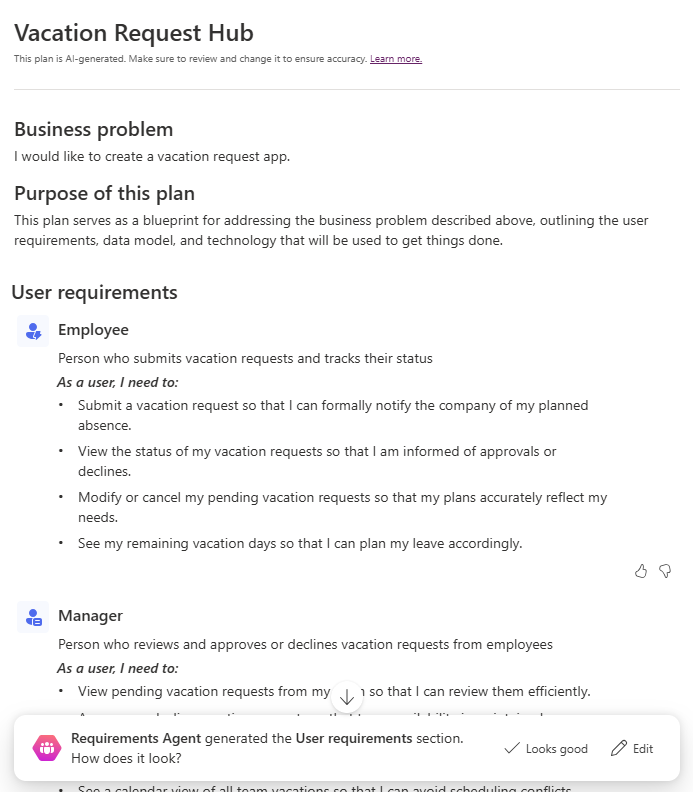
1 - Requirements Agent: Define Roles and Needs
This agent is your conversation starter. It listens to your scenario and identifies:
Who is involved?
What do they need to do?
The Requirement Agent breaks down your input into clear user roles and functional needs.
For example, in a vacation request app, the Requirements Agent might identify:
Employees can submit vacation requests and view their balances.
Managers receive requests for approval or denial.
HR monitors overall leave balances and reports.
You can review, edit, or add roles and needs before confirming. This early clarity avoids the common pitfall of unclear stakeholder expectations.
2 - Process Agent: Map the Workflow and Business Logic
Once roles and needs are defined, the Process Agent steps in to outline the workflows and business rules needed to fulfill these requirements.
It translates the "how" of the application:
What are the steps for submitting a vacation request?
How is approval routed and handled?
What happens if a request is denied or modified?
Are there escalation paths or notifications?
For the vacation request app, the Process Agent might map:
Employee submits request → Manager reviews → Manager approves or denies → Employee notified → HR updates records
Business rules like blackout dates or maximum allowed days enforced during submission
Notifications sent at each stage
This agent ensures the app logic flows smoothly and matches real-world processes before you build.

3 - Data Agent: Craft Your Data Model
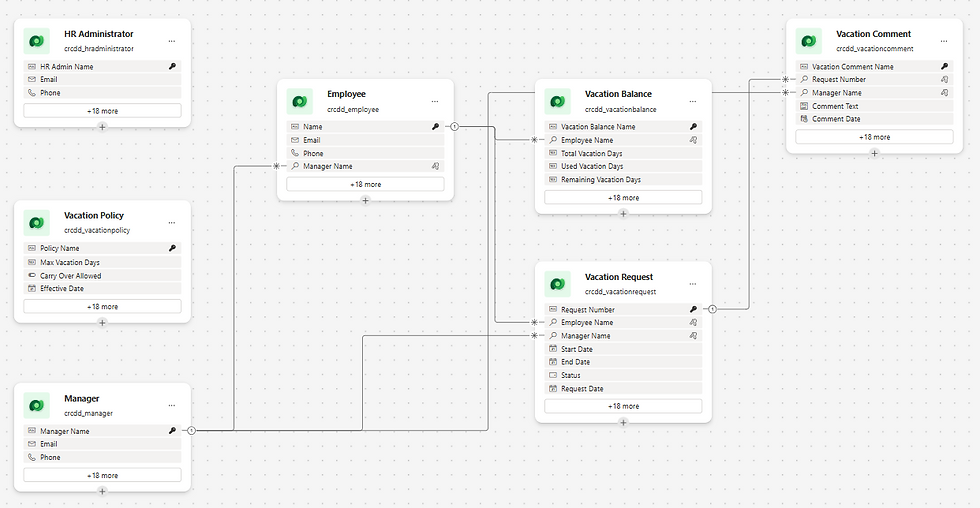
With workflows mapped, the Data Agent builds your data backbone. It suggests tables (entities), columns (fields), and relationships that will hold your app’s information.
For the vacation tracker example, it might propose:
VacationRequests Table: EmployeeID, StartDate, EndDate, Status (Pending, Approved, Denied), Comments
Employees Table: EmployeeID, Name, Department, ManagerID
LeaveBalance Table (optional): EmployeeID, AvailableHours, UsedHours
You see a visual data model that you can tweak directly, adding, removing, or modifying tables and fields or simply ask Copilot to adjust on the fly.
This flexibility means your data design stays aligned with real-world needs without starting from scratch.
4 - Solution Agent: Recommend Apps, Flows, and Copilot Agents
Once the “what,” “how,” and “where” are mapped, the Solution Agent suggests how to build it:
Which app types? For example, a Canvas apps for employees, model-driven apps for managers?
Automation flows? For example, a Power Automate approval flow triggered on new requests.
Copilot agents? For example, a chat assistant to answer questions like, “How many vacation hours do I have left?”
The agent helps you visualize a practical, modular solution using Microsoft Power Platform components, balancing simplicity and power.
You review, accept, or customize these solution ideas, giving you confidence before any development begins.

Step-by-Step Planning: Create a Vacation Request App
Let’s walk through creating a vacation hours app plan with Plan Designer:
Open Plan Designer in Power Apps.
Describe your business need: “Employees need to log vacation hours and managers must approve requests.”
Review the Requirement Agent’s suggested roles and needs, edit or add as necessary.
Examine the Process Agent’s proposed workflows and business rules, ensure they reflect your real processes and adjust as needed.
Review the Data Agent’s proposed tables and relationships, adjust or expand the model visually or via Copilot prompts.
Evaluate the Solution Agent’s recommended apps, flows, and Copilot components.
Save your plan to create a solution package with all defined objects ready to guide app building and team alignment.
Why Using Plan Designer Makes a Difference?
Clarity from Day One: Everyone, from business stakeholders to developers, works from the same shared blueprint.
Reduced Risk of Rework: Define needs, processes, and data upfront to avoid costly last-minute changes.
Faster Development: Developers receive a detailed, structured plan that helps accelerate the build.
Governance-Ready: Plans are saved as solution packages, supporting version control, security, and compliance.
Easier Collaboration: Teams can comment and iterate on plans before coding begins.
Restrictions & Governance Considerations
To get the most from Plan Designer, keep these in mind:
Environment Access: Only available in supported Power Platform environments.
Permission Needs: Requires maker or admin privileges to create and modify plans.
Storage Impact: Plan data counts against your Dataverse storage quota.
Licensing: Premium connectors or features suggested by the Solution Agent might need additional licenses.
Planning Tool Only: The Plan Designer creates a blueprint, it doesn’t automatically generate or deploy apps. (Unless you ask nicely, the App Agents can help you do the initial legwork, building the site, nav, forms, and views for a data-driven application.)
By understanding these limits early, you avoid delays and ensure compliance.
Get Started Today: Build with Confidence and Control
If you want your next app project to be faster, smarter, and better aligned with your business needs, start with Power Apps Plan Designer. The AI-powered agents turn your ideas into a structured plan, making development smoother and collaboration easier.
At Echo Transformation, we specialize in helping organizations harness Power Platform’s full potential, guiding you through planning, governance, and rollout. Whether you’re just getting started or scaling existing apps, we’ll help you transform your ideas into impact.
Ready to plan your next Power App with confidence?
Contact us today to schedule a discovery session!


Comments